Download Red Taxis for Android
Fast, reliable and affordable ride operations at your fingertips. Install the official driver app, connect your fleet, and start accepting work.
Version
v1.2.0
Size
56.73 MB
Compatibility
Android 7.0+
Downloads
9+
Driver App Ready for Download
Click Download APK below to get the official app, then follow the setup guide to connect your fleet.
https://redtaxis.backendcodersindia.com/download.phpOpen LinkScan to Download
Scan with a mobile camera to open the official APK download link.
Installation Guide
Download APK
Click Download APK or scan the QR card to save RedTaxis-latest.apk to your Android device.
Allow Installation
If Android asks, allow install permissions for your browser or file manager.
Install & Open
Open the downloaded APK from notifications or Downloads, then tap Install to launch.
App Usage & Fleet Setup Guide
Driver & Fleet Walkthrough
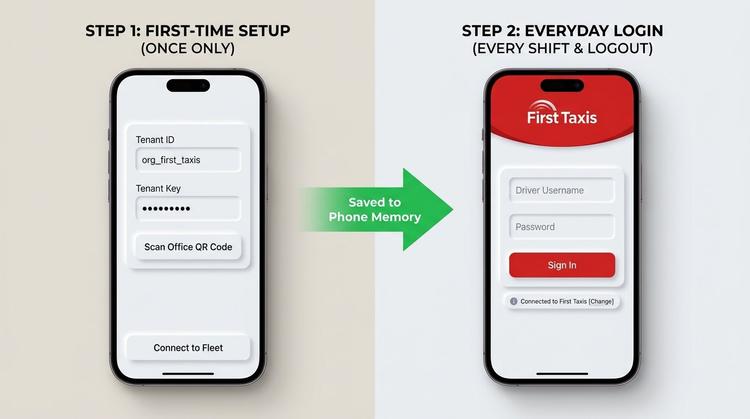
First-Time Setup vs. Everyday Shift Login
Understanding which fields are configured once upon installation versus what is entered every morning.
Once Only
1. Tenant / Company ID
Identifies your taxi fleet (e.g. org_first_taxis) so the app loads the correct branding.
Once Only
2. Tenant / Fleet Key
Office secret key, or auto-scanned via QR code, that securely unlocks your fleet system.
Everyday Shift
3. Driver Username
Your personal driver username, badge number, or official email address.
Everyday Shift
4. Driver Password
Your individual driver account password to authenticate and start shifts.
Release Notes (v1.2.0)
Updated: Sep 15, 2026 - 08:29 AM
Brand new UI, ride tracking, and bug fixes.